GIS Navigator
Overview and Key Concepts
The GIS Navigator is used to calculate the geographic position of travelers as they travel along routes between points on maps. The GIS Navigator has settings that affect how map tiles are rendered and how routes are calculated.
Properties
The GIS Navigator has the following properties:
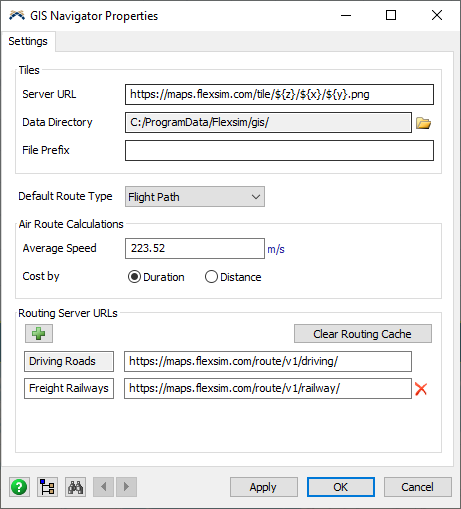
Tile Server URL
Refer to the Maptiler platform guide for instructions on downloading raster map tiles.
This setting is also compatible with other third-party APIs that use the same tile request URL syntax.
Tile Data Directory
Tile files are saved to this directory.
Delete existing files in this directory to download new versions of those files.
Tile File Prefix
Specify an optional prefix to be added to tile filenames when saved on the hard drive.
Use different prefixes to distinguish between tiles when using different tile styles from different tile servers.
Default Route Type
Define the default type for newly created routes.
Air Route Calculation Average Speed
When calculating straight rhumb line and flight paths, use this average speed to calculate the route duration.
Air Route Calculation Cost By
When calculating straight rhumb line and flight paths, use the calculated duration (Fastest Route) or distance (Shortest Route) for the route cost.
Routing Server URLs
Specify the URLs for OSRM servers to download routing information. In addition to the Driving Roads Route Type, you can add more route types and URLs for other routing servers.
e.g., http://router.project-osrm.org/route/v1/driving/
Clear Routing Cache
Delete all cached routing server responses in the GIS Navigator.